Get 1Password
What to do next after a breach, and why I trust 1Password to help lock accounts down
Disclosure
I've been paying for a 1Password account for the last 15 years and much later, partnered with them as a sponsor on HIBP. They're only here due to my personal faith in the product and I continue to use them day in and day out, but it's also important to be transparent about the relationship.

If you're here, it's quite possibly because you've just learned your personal information has appeared in a data breach and you're wondering what to do next. It comes as a bit of a shock for most people but knowing you've been exposed empowers you to then do something about it, especially when passwords are involved.
Let's talk about the real-world impact of passwords in data breaches and, importantly, what you can do about it.
The First Breach is Just the Beginning
With more than 17 billion breached addresses already in HIBP, it's increasingly hard not to be in a data breach (I've been in dozens of them myself). But you do have control over how much it hurts when you're inevitably caught up in one.
Most people reuse passwords across services which means when a breach happens on one website, the bad guys now have the keys to unlock your accounts on other websites. This isn't necessarily a targeted attack on you; it's common practice for hackers to get large volumes of username and password pairs then automate the process of testing them on other services.
So, let's talk about damage control and making sure that a breach of one of your accounts stops there and doesn't cause further damage. That's where 1Password comes in.
How 1Password Secures You
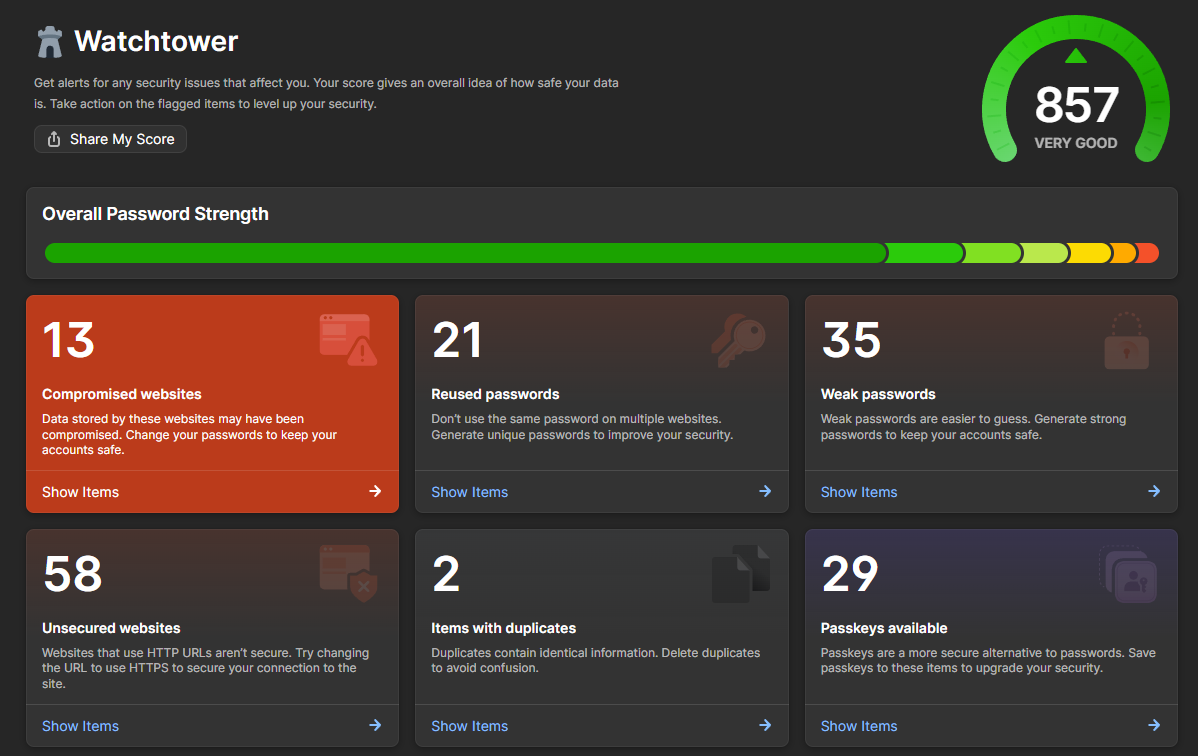
Add your existing accounts, and it'll tell you which email addresses and passwords have already been in data breaches courtesy of 1Password's Watchtower HIBP integration. It's fast and easy to see what's at risk and fix it, and once you've set it up, you'll never have to do it again.
Using 1Password
Let me break it down into three straightforward steps:
1. Install it everywhere
Install 1Password on all your devices so your accounts stay synchronised across your phone, laptop and wherever else you need to log in. Once installed, use it to generate strong, unique passwords for any new services you sign up to.
2. Change compromised passwords
Change the compromised password wherever you've used it. 1Password will help you generate a new password so you can lock down the exposed account, then work through every other place you reused that same password.
3. Lock down the rest
Using 1Password's Watchtower integration you can easily identify any other accounts that are at risk. Go through any other services that have weak or reused passwords and generate new ones for those too. Start with the most important ones email, financial services and social media and work down the list from there.
Now you have all your accounts locked down tightly and tracked in a secure password manager. A breach on one service won't lead to a breach on your other ones.
Why I Still Trust 1Password Today
I use 1Password every single day without exception. My wife uses it. My kids use it. We use it for passwords, for credit cards, for loyalty programs and any other sensitive information we use either personally or across the family. Keeping sensitive information secure by default and easily sharing across our accounts is now just the norm.
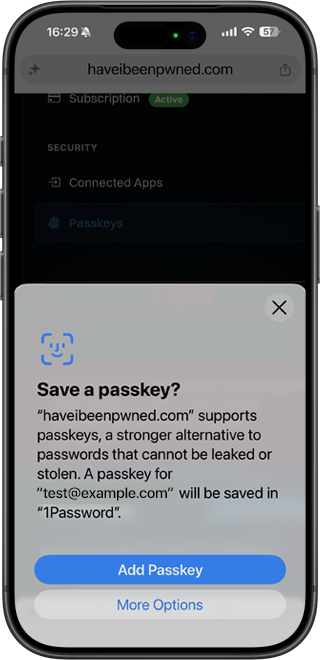
But 1Password also has another killer feature beyond all the security benefits: usability. It's one of the rare cases where being more secure is easier than using the old risky practices. I log in to services with a single tap and biometric security rather than typing out clunky passwords on a tiny phone keyboard. Plus, there's passkey support which is rapidly becoming the preferred means of two factor authentication, or a replacement for passwords altogether. You can even add one to your HIBP account and synchronise it across all your devices with 1Password. It's a major part of the post-password world we've all been waiting for.
Have I Been Pwned and 1Password: Your Trusted Security Partners
Take the next step in your security journey. As Have I Been Pwned's trusted partner, 1Password helps you secure compromised credentials, prevents risk from compromised logins, and provides ongoing monitoring to keep you safe. Get started with your free trial today.
If You Do Nothing...
Nothing will change. A breach on one account becomes a risk on many accounts. Your password will be tested in different places because it's just good business for the hackers, and reuse makes their job easy.
You've come this far, take one more step to protect yourself and give 1Password a go.